
BRING YOUR CHARACTER INTO 3D
AI 3D Character Maker
Turn character artwork into a 3D starting mesh. Explore the shape, then take it into your creative workflow.
30 free credits on day one · No card required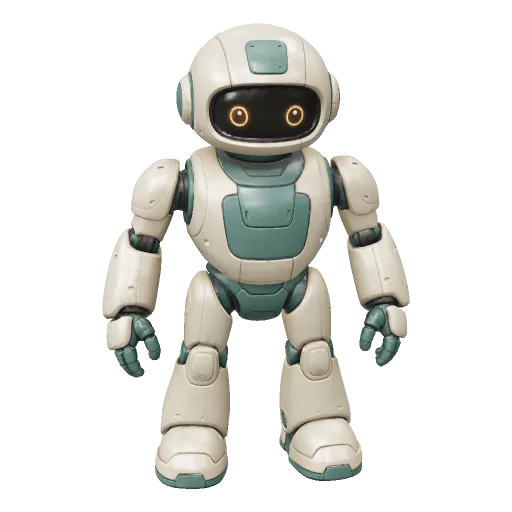
REAL GENERATIONS
Meet the creations
Real character and creature meshes, with their original inputs.
From robot artwork to a character mesh
The real 30-credit result contains 97,226 faces and PBR materials. Inspect limbs, armor and the inferred back. This is a static mesh without bones or animation.
Prepare artwork for a readable full-body character
Fomrix takes one image. Choose the clearest view, rather than uploading a crowded multi-view character sheet.
What an AI 3D character maker gives you
A generated static character can help with concept review and a modeling starting point. It is not automatically a rigged, game-ready character.
A full-body starting surface
The image guides the silhouette, outfit and pose. The back and concealed costume details are inferred rather than read from a model sheet.
Appearance when you choose it
Textures carry visible color and material cues. Clay view helps determine which costume details are actually geometry.
A handoff for further production
Save the original GLB for editing. Retopology, UV refinement, rigging, animations and engine testing depend on the project you are making.
Place generation inside your character pipeline
Use the generated surface to resolve design questions before animation production.
- 01
Prepare full-body artwork
Show the head, hands, feet and costume in one reference. Keep limbs separated where possible so the joints remain readable.
- 02
Generate a concept mesh
Choose geometry or textured appearance. The result is a static surface; asking for an A-pose does not add a skeleton.
- 03
Review anatomy and costume
Compare the front, then inspect the inferred back, joint gaps and accessory intersections in clay and wireframe views.
- 04
Prepare for the final medium
For movement, plan retopology, bones and skin weights. For a static render, refine materials. For a figure, check scale and print structure.
Static concept workflow · no built-in rigging
What must this character do next?
Select a target to see what you receive and which production steps remain.
Build a deformation-ready asset
Generation supplies a static mesh. Import GLB in Blender; Unity needs a glTF importer and Unreal can use its glTF workflow. Test the actual engine setup.
- 01Retopologize for joints and the polygon budget
- 02Create a skeleton and paint skin weights
- 03Test deformations, materials and engine performance
Resolve the character's design before the rig
The value is an inspectable concept mesh and a clear production handoff.
Evaluate the whole costume
Rotate the generated robot to review armor volume and the inferred back, rather than judging a character from a face portrait alone.
Review the robotSee the actual mesh budget
Wireframe and the original face count help plan a topology pass. A dense surface and a deformation-ready game asset are different deliverables.
Compare detail and P1Pick a production path early
A render, animated game character and printed collectible need different checks. Choose the target before adding expensive finish work.
Choose a character handoffChoose a character concept mesh budget
High detail and P1 low-poly are separate model choices. Neither adds bones, skin weights or animation.
Estimated generation cost
Estimate for one generation. Detailed textures and other Studio settings can change the total. P1 is a separate low-poly model, not a cheaper quality switch.
Choose settings in StudioSee credit plansNew accounts: 20 welcome credits once, plus 10 on each login day during the first 7 registration days. Day one totals 30; every grant expires after 7 days. Missed days are not backfilled.
Paid plans add purchased credits for continued generation. Purchased credits do not expire. Local viewers and converters remain free.
Review the character where it matters
An attractive first angle should not hide a production issue.
The limbs or armor intersect
Rotate around joints and inspect clay mode. Change an occluded reference or edit the generated surface before rigging.
Inspect the robot's geometryThere is no rig or animation
The examples are static meshes. Add bones and skin weights in your production tools; a different file extension cannot create them.
Review the editing handoffThe character is too dense for a game
Use wireframe and the original face count to plan simplification or retopology. P1 offers a separate low-poly generation option, with its own credit cost.
Compare generation modelsThree separate character production tasks
- Retopology
- Rebuilding edge flow for the target use. A lower face count alone does not guarantee that elbows and knees deform well.
- Rigging
- Creating a skeleton and controls. Fomrix's published generated characters do not contain a rig.
- Skin weights
- How vertices follow each bone. They must be authored and tested separately before animation.
Character generation questions
Clear answers to common questions about generating, inspecting, repairing, and downloading 3D assets with Fomrix.
Have other questions?
Contact Fomrix support
Need guidance on a specific reference image, custom formats, or print prep? Reach out anytime.
support@fomrix.comCan an AI 3D character generator create a character from an image?
Yes. Character artwork can be used as the reference for AI 3D generation. Fomrix currently accepts one image, so choose the clearest full-body view and review the inferred back and other hidden parts carefully.
Can I turn character art into 3D from one reference?
Yes. Use a readable full-body reference with separated limbs and a clear costume silhouette, then rotate the result to review the hidden surfaces that were inferred.
Does the 3D character include a rig?
Generation and rigging are separate steps. Do not assume every generated character is automatically rigged.
Can I use the character in a game?
A generated asset can be a starting point, but a game production pipeline may require retopology, UV cleanup, PBR textures, polygon targets, rigging and engine testing.
Can I turn the character into an STL for printing?
Yes. The mesh can continue into a print-oriented workflow, but it should be checked and repaired before slicing.
What character images work best?
Full-body references with a clean silhouette, readable limbs and limited occlusion are usually easier to interpret than close-up portraits or crowded scenes.
What file does the character generator return?
The standard Fomrix generation result is a GLB asset that you can rotate and inspect in the browser. The generated file can include texture and PBR material data, but its exact contents depend on the completed job.
Can I create anime, cartoon or fantasy characters?
Stylized humanoids, creatures and collectible-style characters can all be useful references when their silhouettes are clear. Very thin details, layered effects and heavily occluded anatomy remain harder to infer from one image.
Can Fomrix copy the hidden side of my character exactly?
No. One image does not reveal the back or every side surface. The model generates a plausible interpretation, which is why the browser preview and hidden-side review are part of the workflow.
Can I edit the generated character later?
Yes. GLB is supported by common 3D workflows, but editing requirements differ by tool. Retopology, UV editing, rigging, weight painting and animation remain separate production tasks.
Let your character take shape
Add one reference and explore a new perspective.